Hull Rupture System Requirements for PC and Mac
Official Hull Rupture system requirements, plus what the CPU-heavy spec sheet means for laptops, Steam Deck, and late-game performance.
Hull Rupture is a pixel-art strategy game with a surprisingly specific CPU requirement. The store asks for an Intel i7-8700 or AMD Ryzen 5 1600 but pairs it with a GTX 670 or Radeon HD 7970, a graphics card from 2012. That mismatch is the most important thing on the spec sheet: the game is built to simulate a ship full of humans, modules, and pathing aliens, not to push pixels.
The good news is that the storage requirement is only 2 GB and the game supports Windows, macOS, and Linux. The bad news is that "can my GPU run it" is the wrong question. If your CPU is old, late-game waves will stutter even at 1080p.
| Component | Minimum | Recommended |
|---|---|---|
| OS | Windows 10 21H1 or newer (64-bit) | 64-bit OS |
| CPU | Intel i7-8700 / AMD Ryzen 5 1600 | Not specified |
| RAM | 8 GB | Not specified |
| GPU | GeForce GTX 670 / Radeon HD 7970 | Not specified |
| DirectX | Version 11 | Not specified |
| Storage | 2 GB | Not specified |
"Requires a 64-bit processor and operating system."
— Official source: Hull Rupture on Steam
If the CPU requirement is your main concern, the platform page and the demo guide answer the practical questions.
Steam lists only a 64-bit requirement under Recommended. Use the minimum as the baseline and assume a modern quad-core CPU for late-game ships.
What the specs actually mean
The CPU line is doing the real work. An i7-8700 is a six-core desktop chip from 2017; the Ryzen 5 1600 is a six-core chip from the same era. Those are not entry-level processors. Konfa is telling you that the simulation scales with the number of rooms, humans, and enemies on screen, and that a low-end dual-core laptop will struggle once the ship grows.
The GPU line is almost an afterthought. A GTX 670 can render a 2D pixel-art ship at 1080p without breaking a sweat. If you have a modern integrated GPU, you are probably fine on the graphics side; the question is whether your CPU can keep up with the wave logic.
Two practical consequences:
- Late-game stutter is a CPU problem. Lowering shadows or effects will not fix a bottleneck caused by 80 waves of pathfinding. Reducing the simulation load will.
- The demo is a better benchmark than the table. The demo contains the same systems and a slice of the same ship growth. If it runs well at wave 15, the full game will probably run well at wave 15.
The 2 GB storage figure is believable for a 2D game with pixel art and a modest soundtrack. It also means the download is small enough to test on a laptop without clearing space.
Can your PC run it?
Use this rough guide, not as an official statement:
| Your machine | Likely result |
|---|---|
| Modern 6-core desktop, 16 GB RAM, any discrete GPU | Comfortable |
| Gaming laptop from the last 5 years | Playable; expect fan noise and late-game dips |
| Office laptop with 4 cores and integrated graphics | Demo first; may struggle after wave 10 |
| Steam Deck | Playable via Proton, but not officially rated |
| Apple Silicon Mac | Likely fine; native build listed |
| Older Mac with Intel graphics | Test the demo before buying |
The official minimum is a floor, not a target. A machine that meets every line but has a weak cooling system will throttle during long runs. Hull Rupture is the kind of game people leave running for hours, which is exactly when thermal throttling shows up.
Mac and Linux support
Steam lists macOS and Linux as supported platforms. The Mac minimum mentions macOS Big Sur 11 or newer. Konfa has not published separate Mac or Linux CPU/GPU tables, so the Windows minimum is the only detailed reference.
On Linux, the game has a native build. If it does not launch, check the Steam client's compatibility settings before forcing Proton; a native build is usually the better path, but Proton can be more stable on some distributions.
On Mac, the Apple Silicon build is the one to test. Intel Macs with integrated graphics are the risk group, especially the 13-inch models from the late 2010s.
Steam Deck compatibility
Valve has not issued a Steam Deck rating for Hull Rupture. That means there is no Verified or Playable badge to rely on.
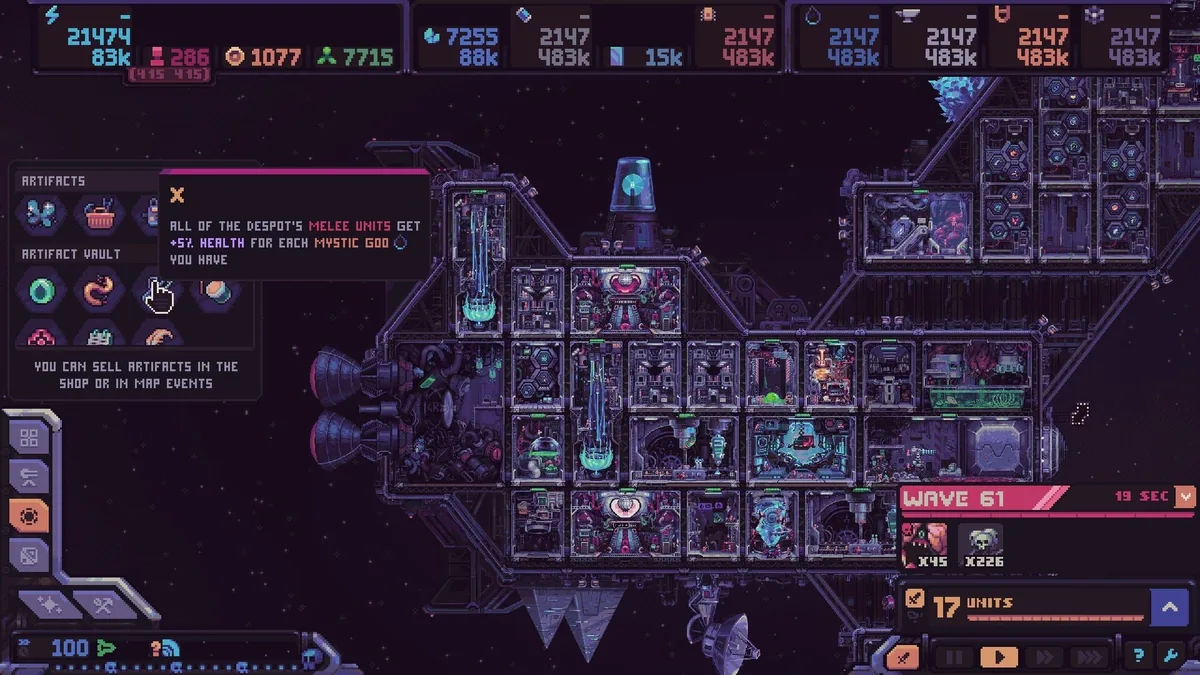
The ingredients are promising: Linux support, a 2 GB install, controller-friendly menu-driven gameplay, and low GPU demands. The risk is text size and CPU load. A dense ship UI on a 7-inch screen can be hard to read, and the late-game simulation is the kind of workload that makes the Deck's APU work.
If you want to play on Deck, install the demo first. Check the UI at 1280x800, then play to wave 10. That will tell you more than a compatibility badge.
How to test before buying
The demo is free and uses the same engine. A sensible test takes about 40 minutes:
- Install the demo on the machine you actually plan to use.
- Play the tutorial, then start a Classic run.
- Reach at least wave 8, so the ship has several modules and a real turret line.
- Open the galaxy map and the shop, the two screens most likely to expose UI scaling problems.
- Check frame pacing during a wave, not just the average frame rate.
If the demo is smooth at wave 8 but stutters at wave 15, the full game will stutter earlier or later depending on your ship size. There is no benchmark mode, so a real run is the only test.
Tweaks for late-game stutter
These are general fixes, not official settings:
- Cap the frame rate at 60. An uncapped menu can run at hundreds of frames and heat the CPU before the run starts.
- Lower the resolution before the effects. Pixel art scales cleanly; the UI and simulation do not care about resolution.
- Close the Steam overlay and browser tabs. The overlay's web layer is a common source of frame spikes in Unity-style games.
- Pause before big builds. Hull Construction already pauses the game; use it to place several blocks without simulating waves.
- Verify files after patches. A stale shader cache can cause stutter that looks like a hardware problem.
If the game is still unplayable on a machine that meets the minimum, report it in the Steam community hub with your CPU, GPU, and wave number. "It stutters" is not actionable; "it drops to 20 fps at wave 14 on a Ryzen 5 3600" is.
Sources and further reading
Related
- Mac, Linux, and console status
- Test performance for free before launch
- Release timing and price status
FAQ
Is Hull Rupture demanding? Not on the GPU. The CPU requirement is the meaningful one, because the game simulates many rooms, humans, and enemies.
How much storage does it need? Two gigabytes. The download is small even by indie standards.
Does it run on Windows 11? Yes. Windows 11 satisfies the Windows 10 21H1 requirement.
Does it run on Mac? Yes, macOS Big Sur 11 or newer is listed. Apple Silicon is the safer bet.
Is there a Steam Deck rating? No. Valve has not rated it. The demo is the best test.
Will the requirements change at launch? They can. Store specs are sometimes updated with the release build. Check the store page on November 4 if you are near the minimum.
More Hull Rupture Guides
How Hull Rupture's hull construction works: the 15-block deck, placement rules, stilt corridors, costs, and layouts that survive late waves.
Hull Rupture treats humans as a resource. Learn where to assign them, when to convert them in the Bioreactor, and how to avoid a population death spiral.
How Hull Rupture modifiers and artifacts work: shop vs event pools, confirmed effects, conditional bonuses, and which builds are worth committing to.
Hull Rupture module guide: confirmed production rooms, adjacency bonuses, module kits, selling duplicates, and placement rules for a stable ship.
Hull Rupture launches on PC, Mac, and Linux on November 4, 2026. There is no PS5, Xbox, Switch, or mobile version. Here is the full platform status.
How Hull Rupture's energy economy works: generator staffing, module upkeep, brownout recovery, and when to stop building before the ship stalls.
Hull Rupture has no full reviews yet. Here is what the April preview build praised, what it criticized, and how the demo's reception frames the launch.
Hull Rupture releases November 4, 2026 on PC, Mac, and Linux. Here is what Steam has confirmed about the price, launch time, demo, and day-one content.